 SubLunio
Last updated:
WMV subtitle facts
| Item | Result or policy |
|---|---|
| Tested audio | wmav2 |
| Detected container | asf |
| Subtitle targets | 110+ (118 currently listed) |
| Output | SRT / VTT / ASS |
| Video upload | No; only extracted audio is uploaded |
| Account duration limit | 8 hours; guest limit 3 hours |
| Full task price | USD $1/hour, rounded up to a cent |
Approach WMV as an archived recording format
A WMV file may be a lecture capture, older screen recording or exported presentation. The media often uses an ASF container with Windows Media audio and video codecs. Browser-native video support can be limited, but that does not automatically determine whether the soundtrack can be extracted for subtitles.
Start with a complete local copy of the recording. If it originated in a presentation tool, keep the original export unchanged while generating a subtitle. A slide deck or project file with the same name is not the media itself; choose the actual file containing the recorded sound.
Check the soundtrack rather than relying on the picture
Some older screen recordings contain clear narration despite a low-resolution or unusual picture codec. For recognition, that narration may be sufficient. The browser media engine inspects the audio independently and creates an MP3 processing copy when the codec is supported. A subtitle text preview shows the wording and timestamps. Check final timing in a local player that supports the original video.
If you later want to watch the picture with subtitles, use a local player that supports the original WMV. Downloading a subtitle does not convert the video or make its image codec natively playable in every browser. Those are separate steps with separate compatibility requirements.
Protected and incomplete recordings need a different source
Some legacy media distributions used protection systems that restrict decoding outside their authorized player. SubLunio does not remove DRM or bypass those restrictions. Use an authorized, unencrypted source you are permitted to process. A protected file cannot be made readable merely by changing its extension to MP4.
An incomplete download can also resemble an unsupported codec problem. Check that the recording plays through locally and that its reported duration is plausible. For an old capture with long silent periods, evaluate actual narrated sections. Speech recognition cannot create a transcript of information that appears only in an unspoken slide.
What the WMA extraction test demonstrates
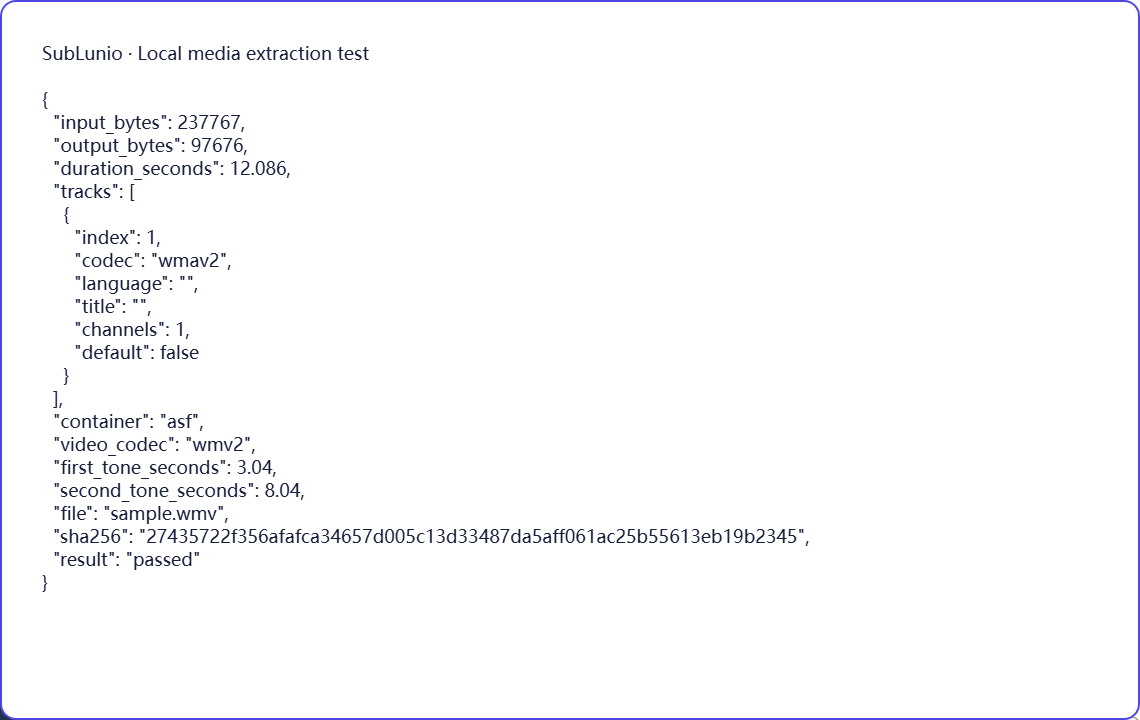
The published fixture uses WMV2 video and WMA2 audio inside a WMV file. Chromium and Firefox successfully produce the expected mono MP3, with the two synthetic tones remaining near their original times. The evidence report records the detected audio codec rather than treating all Windows Media variants as equivalent.
Other WMA profiles, unusual stream configurations and protected recordings require their own checks. The local test is not an ASR benchmark and contains no private lecture content. For your real recording, use the preview to inspect names, numbers and quiet narration before continuing, particularly when the material will be used for instruction.
Choose a language, then evaluate a preview
Select the file above, choose its speaking track and pick the language you want to read. SubLunio offers 110+ subtitle target languages. Source speech recognition has a separate supported list and defaults to Auto; setting the interface language does not limit your target choice. A brief listen can prevent a commentary or alternate dub from becoming the source of an otherwise well-timed translation.
The free web preview starts at the first subtitle and covers up to 5 continuous minutes. Compare the text with a clear line and a more difficult passage. You can start without an account, then sign in to retain the same valid task and continue with the audio already uploaded. A concise glossary can guide recurring names or specialist terms.
Continue and save a portable subtitle
Full generation is priced at USD $1 per hour of the entire video, rounded up to a cent. The preview portion is included in that full duration. Use account credit or pay for the task; card payments have a $1.00 minimum and unused credit remains available. The price is based on duration rather than the original video file size.
Download SRT, VTT or ASS, choosing translated, original or bilingual text. Keep the subtitle beside the exact source edition and test dialogue at several points. The video stays local throughout extraction; server audio is temporary. Save your own subtitle copy and process only material you have the necessary rights to use. Automatic results still need review for names, meaning and timing.
A few things worth knowing
Can I generate from WMV narration without native browser video playback?
If the soundtrack is supported, audio extraction and subtitle generation may still work. The preview then displays subtitle text with timestamps.
Will SubLunio remove protection from a legacy WMV?
No. Use an authorized, unencrypted source that the media engine can read.
Which WMA profile has been exercised in this WMV fixture?
The published synthetic test uses WMA2 audio with WMV2 video.
Will unspoken slides in a WMV lecture appear in the transcript?
No. Information shown only in the picture requires a separate editorial step.