 SubLunio
Last updated:
AVI subtitle facts
| Item | Result or policy |
|---|---|
| Tested audio | mp3 |
| Detected container | avi |
| Subtitle targets | 110+ (118 currently listed) |
| Output | SRT / VTT / ASS |
| Video upload | No; only extracted audio is uploaded |
| Account duration limit | 8 hours; guest limit 3 hours |
| Full task price | USD $1/hour, rounded up to a cent |
Look beyond the familiar AVI filename
AVI recordings can come from older cameras, capture cards, editing applications or archived downloads. Their age and variety mean that the same extension can hide very different codecs and index structures. A filename alone is not a reliable compatibility test. Let the local inspection identify the actual streams before deciding how to proceed.
For subtitle generation, you need a usable speaking soundtrack. The video image may rely on a legacy decoder that the browser does not provide, while the audio is still readable by the media engine. In that case a subtitle text preview with timestamps helps you review the wording without first converting the entire picture.
Preserve a copy when an older file has index problems
A truncated AVI or a recording with an incomplete index may report an unreliable duration or fail when seeking. Keep an untouched copy before using a repair tool. Renaming the extension or changing the subtitle target cannot fix a broken media index. Check that a trusted local player can reach the end of the source.
If you already maintain an archival workflow, consider making a properly finalized working copy there. Use that same working edition for both generation and final playback. A repaired file whose duration or packet timing changed should not silently inherit subtitles from an earlier, damaged version.
Timing changes can be more important than the video codec
Old captures may contain dropped frames, pauses or audio that begins after the picture. The extraction path preserves the input timeline and accounts for gaps instead of simply joining all audio packets together. The objective is to keep subtitle times meaningful against the selected source file.
Nevertheless, inspect more than the opening line. A constant offset and a delay that grows through the recording are different problems. The first can sometimes be adjusted in a player; the second may indicate an edition mismatch or capture issue. Review a middle section and the ending before distributing subtitles for an archival recording.
The AVI fixture and its practical limit
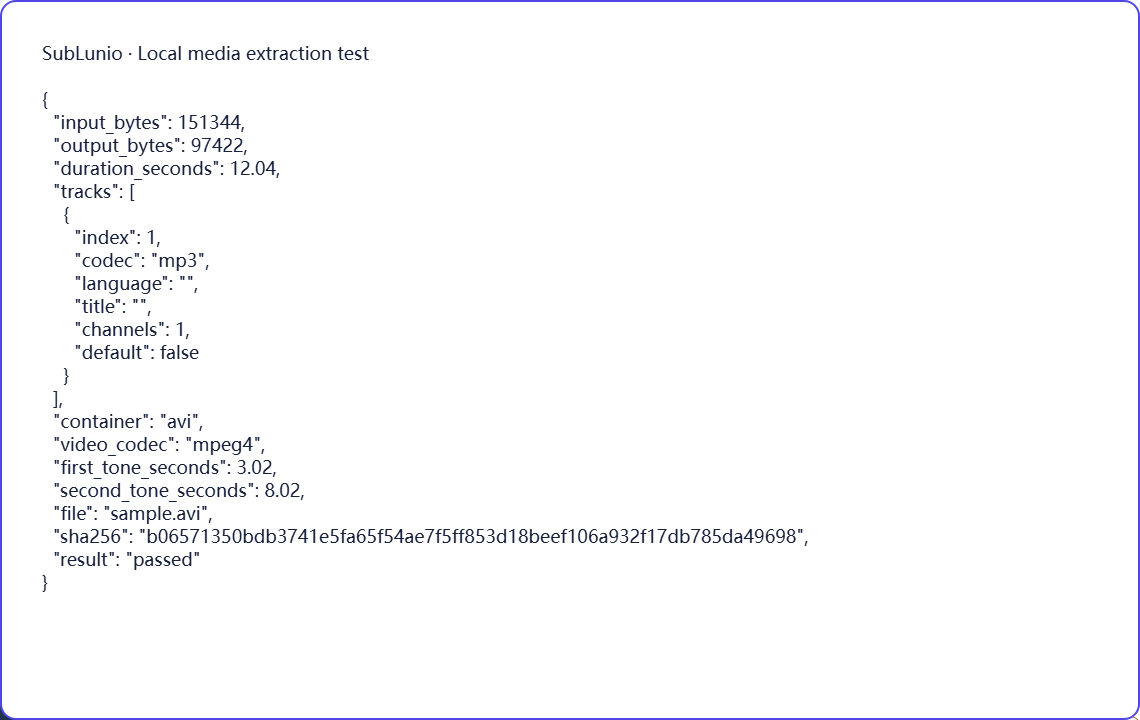
The reproducible local AVI test contains MPEG-4 video with MP3 audio. Its known tone positions survive extraction to the service’s mono 16 kHz MP3 processing format in Chromium and Firefox. The report records the detected container, selected codec and output characteristics, and the screenshot shows that specific completed check.
This fixture does not represent every historical AVI codec or damaged capture. It is evidence for a particular supported path. If your own file fails inspection, compare its actual audio codec and completeness, and try another valid track when available. Do not purchase a task for a file that the local workflow has already reported as unreadable.
Choose a language, then evaluate a preview
Select the file above, choose its speaking track and pick the language you want to read. SubLunio offers 110+ subtitle target languages. Source speech recognition has a separate supported list and defaults to Auto; setting the interface language does not limit your target choice. A brief listen can prevent a commentary or alternate dub from becoming the source of an otherwise well-timed translation.
The free web preview starts at the first subtitle and covers up to 5 continuous minutes. Compare the text with a clear line and a more difficult passage. You can start without an account, then sign in to retain the same valid task and continue with the audio already uploaded. A concise glossary can guide recurring names or specialist terms.
Continue and save a portable subtitle
Full generation is priced at USD $1 per hour of the entire video, rounded up to a cent. The preview portion is included in that full duration. Use account credit or pay for the task; card payments have a $1.00 minimum and unused credit remains available. The price is based on duration rather than the original video file size.
Download SRT, VTT or ASS, choosing translated, original or bilingual text. Keep the subtitle beside the exact source edition and test dialogue at several points. The video stays local throughout extraction; server audio is temporary. Save your own subtitle copy and process only material you have the necessary rights to use. Automatic results still need review for names, meaning and timing.
A few things worth knowing
Does an AVI filename guarantee support for its old audio codec?
No. AVI can carry different codecs; the actual media inspection determines the usable path.
What should I do with an AVI that cannot seek to the end?
Preserve the original and obtain or prepare a complete, correctly indexed working copy before generation.
Why might an AVI subtitle drift instead of having one fixed delay?
Capture issues, missing sections or different editions can produce changing offsets that one delay adjustment cannot solve.
Which AVI combination is shown in the published test?
The synthetic fixture contains MPEG-4 video and MP3 audio.