 SubLunio
Last updated:
M4V subtitle facts
| Item | Result or policy |
|---|---|
| Tested audio | aac |
| Detected container | mov,mp4,m4a,3gp,3g2,mj2 |
| Subtitle targets | 110+ (118 currently listed) |
| Output | SRT / VTT / ASS |
| Video upload | No; only extracted audio is uploaded |
| Account duration limit | 8 hours; guest limit 3 hours |
| Full task price | USD $1/hour, rounded up to a cent |
Determine whether your M4V actually contains audio
The .m4v extension is used for more than one kind of media. Some files are MP4-family containers with audio and video, while others are raw video streams without a soundtrack. The extension therefore cannot establish that dialogue is present. Local inspection needs to find an actual audio stream before subtitles can be generated.
If the file contains only picture data, obtain the matching authorized audio or a complete audiovisual export from your editing workflow. Renaming a raw video stream to .mp4 does not add sound. SubLunio reports the absence of audio instead of treating a silent input as a translation problem.
Use an unprotected, readable source
Some media sold through distribution platforms may use access controls or DRM. SubLunio does not decrypt protected M4V files or remove usage restrictions. Having a filename on disk does not necessarily mean that a general-purpose media decoder is permitted or able to read its soundtrack.
Choose an authorized, unencrypted export you are allowed to process. If a file plays only inside its vendor’s application, check that vendor’s permitted export options rather than attempting to bypass protection. The subtitle workflow is for readable local media and cannot turn a protected purchase into an unrestricted video.
Match the soundtrack to the edition you will watch
An audio-bearing M4V can include alternate language streams or descriptive audio. Select the dialogue track you want to follow, and listen if the labels are unclear. An English dub and a Japanese original can differ in wording even though they accompany the same visual story.
Keep the subtitle paired with that exact export. A different edition may have an added opening, trimmed credits or changed scenes. Check an early conversation and a later one after downloading. A subtitle that starts correctly can still diverge after an edit, so the first visible line is not sufficient evidence of a complete match.
M4V evidence is deliberately limited to an audio-bearing container
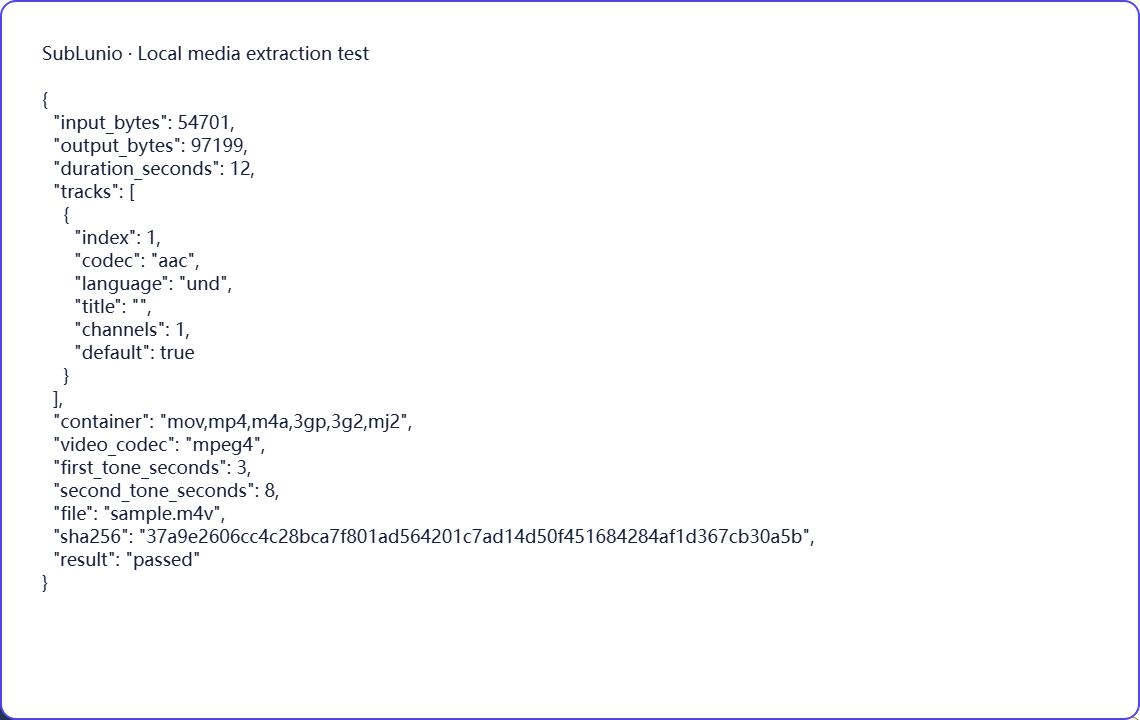
Our original fixture is an MP4-family container saved with the M4V extension, containing MPEG-4 video and AAC audio. Chromium and Firefox successfully extract its soundtrack and preserve the two known tone positions in the MP3 output. The report identifies the detected container, not just the filename suffix.
This check does not cover raw video-only M4V streams or protected store downloads. It demonstrates the supported path for the listed unencrypted audiovisual combination. Use the local inspection result on your own file before proceeding. If no valid speaking track is available, there is no useful subtitle task to purchase for that source.
Choose a language, then evaluate a preview
Select the file above, choose its speaking track and pick the language you want to read. SubLunio offers 110+ subtitle target languages. Source speech recognition has a separate supported list and defaults to Auto; setting the interface language does not limit your target choice. A brief listen can prevent a commentary or alternate dub from becoming the source of an otherwise well-timed translation.
The free web preview starts at the first subtitle and covers up to 5 continuous minutes. Compare the text with a clear line and a more difficult passage. You can start without an account, then sign in to retain the same valid task and continue with the audio already uploaded. A concise glossary can guide recurring names or specialist terms.
Continue and save a portable subtitle
Full generation is priced at USD $1 per hour of the entire video, rounded up to a cent. The preview portion is included in that full duration. Use account credit or pay for the task; card payments have a $1.00 minimum and unused credit remains available. The price is based on duration rather than the original video file size.
Download SRT, VTT or ASS, choosing translated, original or bilingual text. Keep the subtitle beside the exact source edition and test dialogue at several points. The video stays local throughout extraction; server audio is temporary. Save your own subtitle copy and process only material you have the necessary rights to use. Automatic results still need review for names, meaning and timing.
A few things worth knowing
Why does one M4V report no audio while another works?
The extension can describe an audio-bearing container or a raw video stream. The contents determine whether sound exists.
Does renaming raw M4V to MP4 add a soundtrack?
No. Renaming does not change the media streams.
Are protected M4V store downloads supported for decryption?
No. This workflow does not remove DRM or bypass access restrictions.
What kind of M4V is included in the test report?
An unencrypted MP4-family container with MPEG-4 video and AAC audio, saved with the M4V extension.